If copying information into an AI tool saves five minutes but checking the answer takes ten, the workflow has not improved. Start with the whole task, including the handoff that follows the draft.
For the wider planning context, start with the main guide to AI in a small business.
THE SHORT ANSWER
Your first AI workflow, end to end
Map the manual process, set the approved inputs and keep drafting apart from any outside action. Test normal and awkward cases before you expand.
- Pick a task you repeat, with a clear finish line, before you choose an AI service or automation tool.
- Keep the source facts apart from what the AI makes of them. Show missing details clearly instead of filling them with guesses.
- Name a reviewer who checks the facts, the exceptions and how the output is used.
- Count prep, review and fixes as well as drafting time when you judge whether the workflow helps.
- 01BoundInput + intended output
- 02ReviewEvidence + exception route
- 03Hand overApproval + action + record
Rule of thumbMeasure the complete task, including corrections.
- 1Define the input and the finish lineWhat goes in, what counts as done
- 2Map the process on paperBefore connecting any service
- 3Write instructions around the evidenceTask, sources, structure, limits
- 4Test with a small, labelled exampleInvented notes, not live data
- 5Try ordinary and awkward casesMissing fields, odd inputs, errors
- 6Name who handles exceptionsAn owner and a “needs attention” route
- 7Compare with the old wayTime and quality, measured the same way
How we researched this guide
Evidence: A research-based guide with labelled examples. We read the official docs and primary sources on 18 November 2026. Prices show what they cover and when we checked them. Examples explain the method. They are not customer results or product tests. Read our evidence standards.
What makes a task suitable for an AI workflow?
A good first task happens often enough to review as a process, uses data in a steady format and produces something you can check. Summing up approved notes, drafting an outline from a brief or suggesting categories for incoming requests can work. A vague goal like “run our marketing” is too broad to test.
Start by describing the existing job in plain words. Who does it? What information do they collect? What decisions do they make? What does the next person need? This often reveals that only one part of the task needs AI. A template or fixed rule may handle the rest more reliably.
Keep help apart from authority. Writing a draft is not the same as approving a customer promise, making a payment or deciding who qualifies for a service. For a first workflow, pick a task where a person can check the result before it changes anything outside the team.
Read the small business AI guide for the bigger decision framework. The AI & Automation hub links this tutorial to the review and planning resources.
Step 1: define the input and the finish line
Write a short list of inputs. For the report example, that might be the reporting period, approved campaign notes, confirmed numbers and known issues. Say which file wins if two sources disagree. Mark a missing number as missing, so the system does not guess it from nearby text.
Then describe the output in a form the next person can use. A weekly report draft might need 4 parts: what changed, the supporting observations, unresolved questions, and proposed next actions. “Make it professional” is a tone preference; it does not explain what the report must contain.
Add pass checks before you write the prompt. Every number must trace back to the source notes. Every suggested action must be labelled as a suggestion. An owner or deadline should appear only if the source gives one. The reviewer should spot missing details without checking every sentence against the notes.
Step 2: map the process before connecting services
Sketch the sequence as input, draft, review, and approved output. Add an exception route for missing information or a failed request. The diagram is a planning aid; it is not evidence that an integration has been deployed.
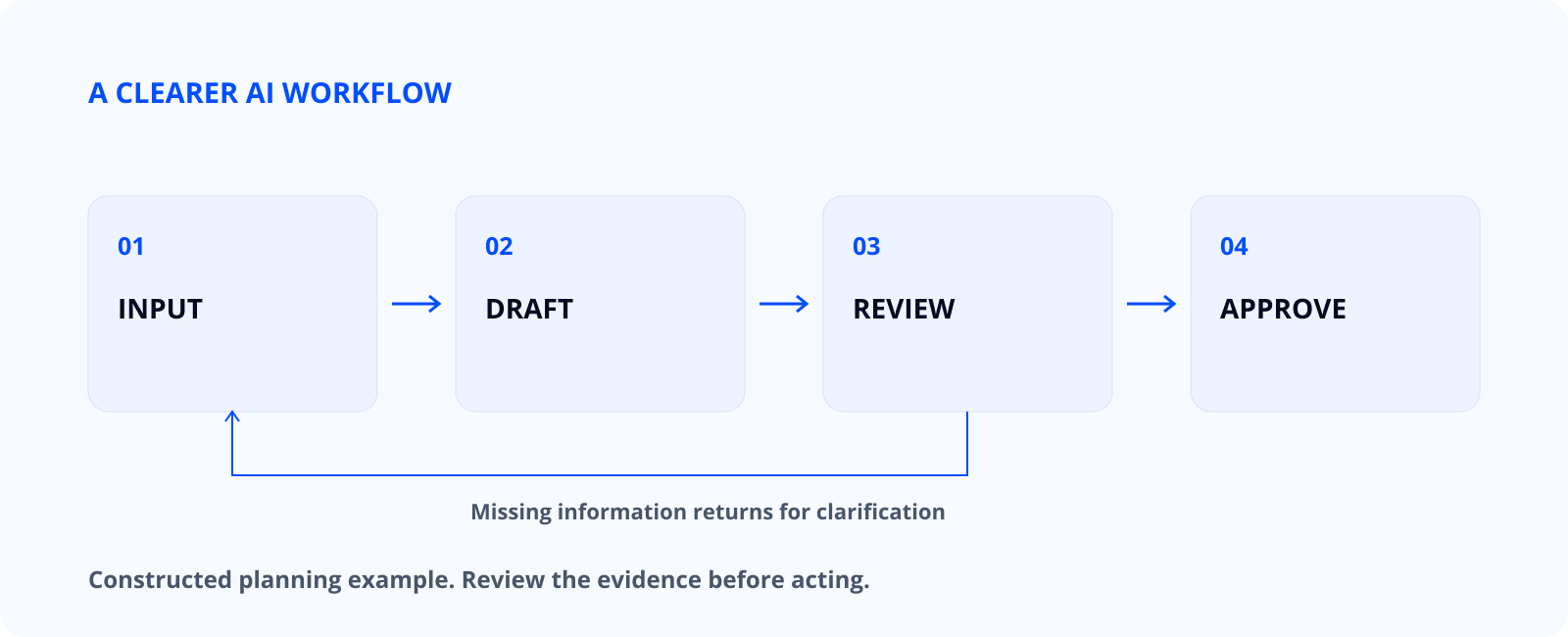
- Gather the approved input and check that it belongs to the correct reporting period.
- Generate a draft using a set structure and clear rules for missing details.
- Review facts, wording, proposed actions, and any unsupported interpretation.
- Save the approved result and record issues that should improve the next run.
Keep the first version manual. Copying a small example through the steps makes the work visible. If you cannot explain what should happen at each handoff, an automatic connection will make the uncertainty harder to notice rather than resolve it. For a start-to-finish example, see our AI enquiry workflow, which applies these steps to customer enquiries.
Step 3: write instructions around the evidence
Start with a short plain-language spec. Say what starts the task, which sources it may use, which source wins when two disagree, and what counts as finished. Say where the output goes and who approves it. The spec should still make sense if you swap the tool later.
A good prompt names the task, the allowed sources, the structure and the limits. Ask for a result a reviewer can check. Do not ask it to sound certain when the source is incomplete. Allow it to say “not provided” when something is missing.
Task: prepare a draft weekly activity summary from the notes below.
Use only the supplied notes as factual evidence.
Keep confirmed observations separate from suggested actions.
If a number, owner, date, or explanation is missing, write “not provided”.
Output: 1) confirmed changes, 2) unresolved questions,
3) suggested next actions, 4) facts the reviewer must check.
Do not send, publish, or update another system.
“Do not take outside actions” is part of this example’s scope. In a later connected workflow, decide which actions are allowed and what approval each needs. Do not rely on a prompt alone to enforce access that the service or integration should control.
Make the limits concrete. “Do not send messages or create tasks in another system” keeps a draft from becoming an action. The NIST Generative AI Profile gives the wider risk context; turn it into checks that fit your task.
If the output is inconsistent, change one thing in the instructions and rerun the same example. Changing the task, input and expected result at once makes it hard to tell why things got better. Keep a short version note for each set of instructions you test.
Step 4: use a small, clearly labelled example
Take these made-up notes: the team published 2 landing-page drafts; one is waiting for a product-detail check; a client asked for a clearer pricing explanation; the reporting owner has not sent the latest lead count. The notes hold finished work, an open question and a missing number.
A useful output would retain those distinctions. It would not announce improved lead quality, invent a percentage increase, or assign a deadline that does not exist. The proposed action could be “ask the reporting owner for the latest lead count,” but the output should identify that as a suggestion.
| Input observation | Acceptable draft treatment | Reviewer check |
|---|---|---|
| 2 drafts were prepared | State that 2 drafts were prepared | Confirm the count and reporting period |
| One detail check is pending | List it as unresolved | Confirm who can resolve it |
| Lead count is missing | Write “not provided” | Obtain the authoritative measurement |
| Pricing wording was questioned | Summarise the request without inventing a cause | Check the source wording |
This table is a made-up example. It shows what traceable output looks like, not how well any model performed. Swap in approved sample data only after you check the service’s data settings and what your organisation lets it process.
Step 5: test ordinary cases and awkward cases
A normal example shows whether the workflow produces the right shape. Awkward examples show what happens when the assumptions break. Include incomplete notes, clashing dates, duplicates, an empty input and a request outside the task. Decide the expected response before you run each case.
Use a small evaluation log with columns for the case, expected behaviour, actual behaviour, reviewer notes, and the change to make. A clear failure can be more informative than a polished answer. The aim is to learn where the process needs a narrower task, a better input check, or a stronger approval step.
One good run does not prove it is reliable. Test a mix of examples and keep the limits in view. If a task often needs heavy fixes or judgement you cannot spell out, keep the manual process or use AI for a smaller part of the job.
The AI output review checklist provides a more detailed review method. Use it to decide what the reviewer is checking rather than asking someone to approve a draft without a defined standard.
Step 6: decide who handles exceptions
Every workflow needs someone who owns the result and someone who can fix the process. In a small business that may be one person, but the jobs are still different. A reviewer checks today’s draft. A process owner decides whether the inputs, instructions or connections need to change.
Decide what happens if a source is missing, a service returns an error or the reviewer cannot confirm a statement. A simple “needs attention” queue is often enough. Do not auto-retry an action if you do not know whether the first try already changed a connected system.
Keep an approved output separate from a generated draft. A status such as “ready for review” should not be mistaken for “approved.” Use clear filenames, folders, or fields so the next person can identify the version they are allowed to use. This is a process decision, not merely a formatting preference.
Step 7: compare the complete task with the baseline
Time the current process before you claim a time saving. Record how long it takes to gather information, prepare the result, review it and settle questions. Then measure the new workflow the same way. Comparing only AI drafting time with the whole manual job gives a misleading result.
| Stage | Baseline minutes | Proposed workflow minutes |
|---|---|---|
| Gather and prepare inputs | Enter your measurement | Enter your measurement |
| Produce the first draft | Enter your measurement | Enter your measurement |
| Review and correct | Enter your measurement | Enter your measurement |
| Resolve exceptions | Enter your measurement | Enter your measurement |
Leave the cells blank until you have measurements. Include quality notes alongside time. A faster draft that causes more downstream checking may not improve the work. Decide what level of correction is acceptable and who can make that decision before presenting the workflow as a success.
Common mistakes that make a small workflow harder
Starting with several connected tools creates more failure points before the task is understood. Begin with the smallest sequence you can explain. Adding a new service should solve a defined problem, not provide an impressive-looking diagram.
Another mistake is treating a fluent answer as verified information. Readable wording does not show that a claim follows from the source. Require source references or an explicit list of facts to check when the output includes important numbers, dates, or conclusions.
Teams also underestimate upkeep. Instructions, source formats, access and service limits all change. Note the owner, the last real change and the checks to run after an update. A workflow nobody maintains becomes a hidden risk.
Download the planner and choose your next step
Use the free AI workflow planner to define the task, owner, inputs, output, review checks, exception route, and baseline. Fill it in before choosing an integration platform.
Pick one task you repeat, prepare a sample with no sensitive data and run the steps by hand. Keep the workflow only if the whole process is useful and easy to follow. If buying software becomes part of the plan, use the software evaluation checklist to compare needs and costs.
Tools to consider
Research shortlist, not tested reviews. These are tools to look into, not endorsements or a ranking. We checked prices and plan limits on the linked official pages on 16 November 2026. Recheck the current quote, taxes, renewal terms and availability before you buy.
Choose the assistant after defining the input, output and manual fallback. The products below can support the drafting step; this is not a claim that they execute an entire workflow unattended.
| Tool | What it is for here | Who it may suit | Starting price and conditions |
|---|---|---|---|
| Google Gemini | Draft a structured response from a synthetic enquiry using your required output fields. | A small team beginning with a supervised, manual copy-and-review workflow. | ₹0/month with a Google Account; usage limits apply. Optional AI Plus is ₹399/month. Official pricing / plan details Price checked on 16 November 2026. |
| Microsoft Copilot | Summarise a public source into a handover note with links for checking. | An operator who wants to explore an assistant before considering paid Microsoft integration. | Free version: ₹0, subject to limits. Microsoft 365 Personal with added app integration is ₹689/month. Official pricing / plan details Price checked on 16 November 2026. |
| Claude | Compare a draft against an explicit rubric and flag omissions for a person to inspect. | An editor building a repeatable review step rather than automated approval. | US$0 on Free, with usage limits; Pro is US$20/month on monthly billing, before applicable tax. Official pricing / plan details Price checked on 16 November 2026. |
Run normal and exception inputs through the same steps. If the output needs a connector, API or scheduled automation, price that separately. A consumer chat plan does not include it by default.
Choose a connector around the process and billing unit
| Tool | A sensible starting use | What changes the cost |
|---|---|---|
| Zapier | Connecting common business apps through a trigger and actions | Tasks, premium features and the selected allowance |
| Make | Mapping a visual process with branches and transformations | Credits used by the modules and any AI feature |
| n8n | A workflow that needs more technical control or self-hosting | Hosted executions, or your own hosting, security and maintenance |
| Power Automate | Work already managed in Microsoft’s ecosystem | Licence scope, connectors and the way the flow is run |
Official references: Zapier plans, Make pricing, n8n pricing and Power Automate pricing. These are options to consider, not tested picks. An assistant’s chat plan may not cover the API use a connector needs.
A source-backed build recipe for a draft enquiry reply
- Trigger: a new enquiry reaches an authorised mailbox or form. Record the message ID.
- Filter: ignore duplicate IDs, spam and messages outside the approved service.
- Prepare: extract only the fields needed for the task. Keep the approved factsheet separate from the customer’s text.
- Draft: ask the model to answer from the factsheet and list missing information. Do not connect an automatic send action.
- Review: a named person checks scope, price, deadline and recipient. Record approval or the reason for stopping.
- Finish: send only after approval, then record the final message ID. If the send result is uncertain, check the mailbox before retrying.
This is a documented build recipe, not a claim that a live mailbox integration was deployed. See the full enquiry example for the factsheet and exception cases.
Continue with the related guides
- A practical guide to AI for small business teams
- AI output review checklist for a small team
- Software evaluation checklist: 25 questions before you buy
- Zapier vs Make vs n8n: Choose by Workflow and Cost
- AI Tools for Small Business: A Function-Based Shortlist
Questions about a first AI workflow
Do I need an automation platform?
No. A manual sequence is enough to test the task, instructions, and review process. Connect services only after the handoffs are clear.
Can I use real customer information?
Use only data you are allowed to process, and read the service’s data terms before sharing it. Start with examples that are not sensitive.
What if the result sounds confident but is wrong?
Compare the claim with the source and reject unsupported statements. Confidence of tone is not an acceptance criterion.
How many examples should I test?
There is no magic number. Include a mix of normal and exception cases, record what you saw and do not claim more reliability than that evidence shows.
When should I stop using the workflow?
Pause it when inputs change, failures are unclear, or review effort outweighs the benefit. Keep a manual route available for important work.
When is it worth connecting the workflow to other tools?
Connect services once you understand the manual handoff, the repeated work justifies the setup and the team can handle failures. First define the source record, the approval point, the destination and how you stop duplicates. Start with the least access needed. A connection should make a useful process easier to run, not hide missing decisions about who is responsible.
What should happen when a run stops halfway through?
Check what actually finished before you restart. A timeout or missing confirmation does not prove an outside action never happened. Use the record or destination to see the real state, then resume through the approved recovery route. Keep the task reference, note where it stopped and keep a manual option. Blind retries can create duplicate messages or mismatched records.
Sources and further reading
- NIST AI Risk Management Framework core for defining tasks and considering risks.
- NIST human–AI interaction guidance for the role of people in AI-supported systems.
- TechVendorly testing standards for distinguishing a planning framework from a hands-on evaluation.
- Google Gemini: official plan and pricing information (checked 16 November 2026).
- Microsoft Copilot: official plan and pricing information (checked 16 November 2026).
- Claude: official plan and pricing information (checked 16 November 2026).
What changed on 14 Nov 2026: expanded the starter article into a complete planning guide, added a constructed example, evaluation tables, review questions, and a downloadable planner.
Last updated: 21 November 2026. Individual prices retain their stated check dates.